> ## Documentation Index
> Fetch the complete documentation index at: https://help.fieldpulse.com/llms.txt
> Use this file to discover all available pages before exploring further.
# Setting Up Customer Statuses
> Set and change the status on a FieldPulse customer record to track where each customer stands in your sales process, and filter customers by status.
> **Who uses this:** Roles with the **Create & edit Customers** permission — Yes for Admins, configurable for Team Managers, and No for Service Agents and Limited Agents. **Availability:** All regions.
A customer status marks where a [customer](https://www.fieldpulse.com/features/customer-management) sits in their lifecycle with your business, from a first inquiry through to a paying customer. FieldPulse tracks that on a single **Status** field on the customer record, which you set when you create the customer and update as the relationship moves along.
## Overview
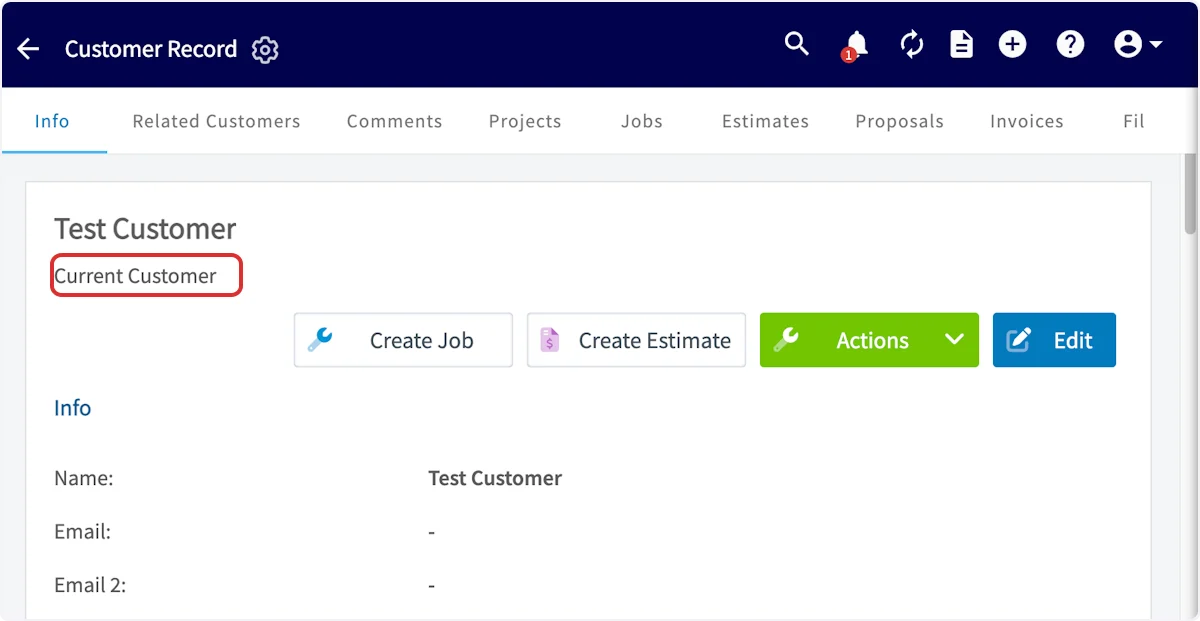
FieldPulse offers six customer statuses — **Lead**, **Opportunity**, **Current Customer**, **Lost**, **Other**, and **Inactive**. You pick one on the **Status** field while creating the customer, change it on the customer record as the customer moves through your sales process, and use the **By Status** tab on the **Customers** page to pull up everyone at the same stage. A customer's current status appears under their name at the top of the customer record.
 ## Video walkthrough
Watch a short walkthrough of customer statuses, then follow the written steps below.
## Before you begin
* Sign in as a user with the **Create & edit Customers** permission. Admins have it, and an Admin can enable it for a Team Manager.
* Know which field you are setting. **Status** and **Pipeline Status** are two separate fields on the customer record — this page covers **Status**. Pipeline Status is the one you customize in Company Settings, covered in [Setting Up a Custom Sales Pipeline](/customers/leads-pipeline/sales).
## Step-by-step setup
### Set the status on a new customer
Set the status while you create the customer, on the same form as the rest of the customer's details.
1. Go to **Customers** and select **Create Customer**.
2. In the **General** section at the top of the form, select the **Status** dropdown.
3. Choose the status that matches where the customer stands — **Lead**, **Opportunity**, **Current Customer**, **Lost**, **Other**, or **Inactive**.
4. Finish entering the customer's details, then select **Save Customer**.
## Video walkthrough
Watch a short walkthrough of customer statuses, then follow the written steps below.
## Before you begin
* Sign in as a user with the **Create & edit Customers** permission. Admins have it, and an Admin can enable it for a Team Manager.
* Know which field you are setting. **Status** and **Pipeline Status** are two separate fields on the customer record — this page covers **Status**. Pipeline Status is the one you customize in Company Settings, covered in [Setting Up a Custom Sales Pipeline](/customers/leads-pipeline/sales).
## Step-by-step setup
### Set the status on a new customer
Set the status while you create the customer, on the same form as the rest of the customer's details.
1. Go to **Customers** and select **Create Customer**.
2. In the **General** section at the top of the form, select the **Status** dropdown.
3. Choose the status that matches where the customer stands — **Lead**, **Opportunity**, **Current Customer**, **Lost**, **Other**, or **Inactive**.
4. Finish entering the customer's details, then select **Save Customer**.
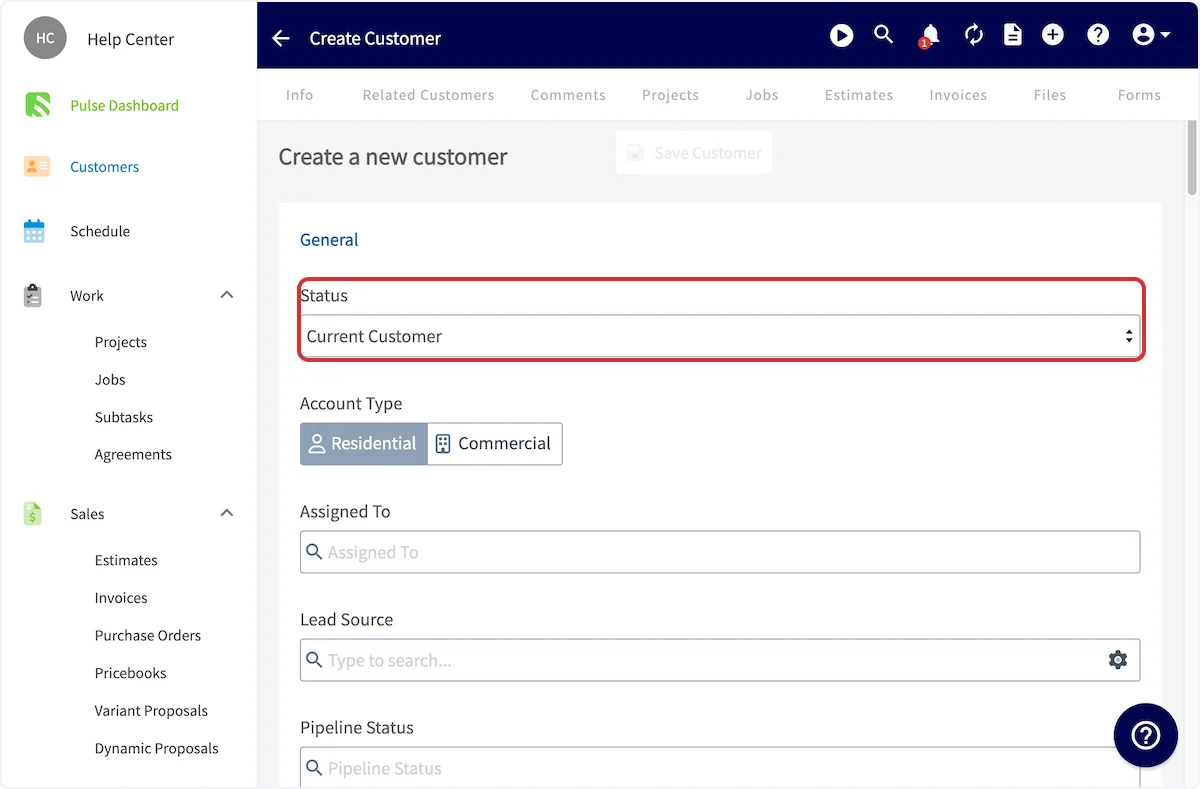
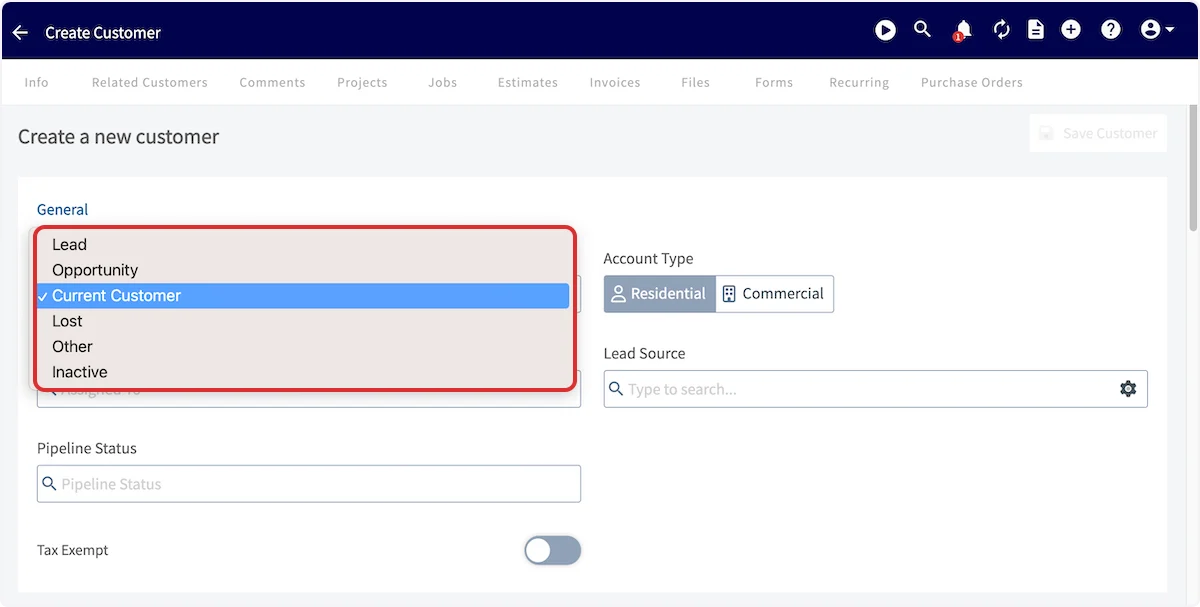 Every new customer record defaults to **Current Customer**, so change the status while you create the record if the customer is a lead or an opportunity.
In the FieldPulse mobile app the same field is **Account Status**, at the top of the **New Customer** form — set it there while you create the customer. See [How to Create a Customer](/customers/managing-customers/creating-a-customer).
### Change the status on an existing customer
Change the status on the customer record as the relationship changes — for example, from **Lead** to **Current Customer** once that customer purchases your services.
1. Go to **Customers** and select the customer you want to update.
2. On the customer record, select **Edit**.
3. Find the **Status** section and choose a new status from the dropdown.
4. Save the customer record.
## Filter customers by status
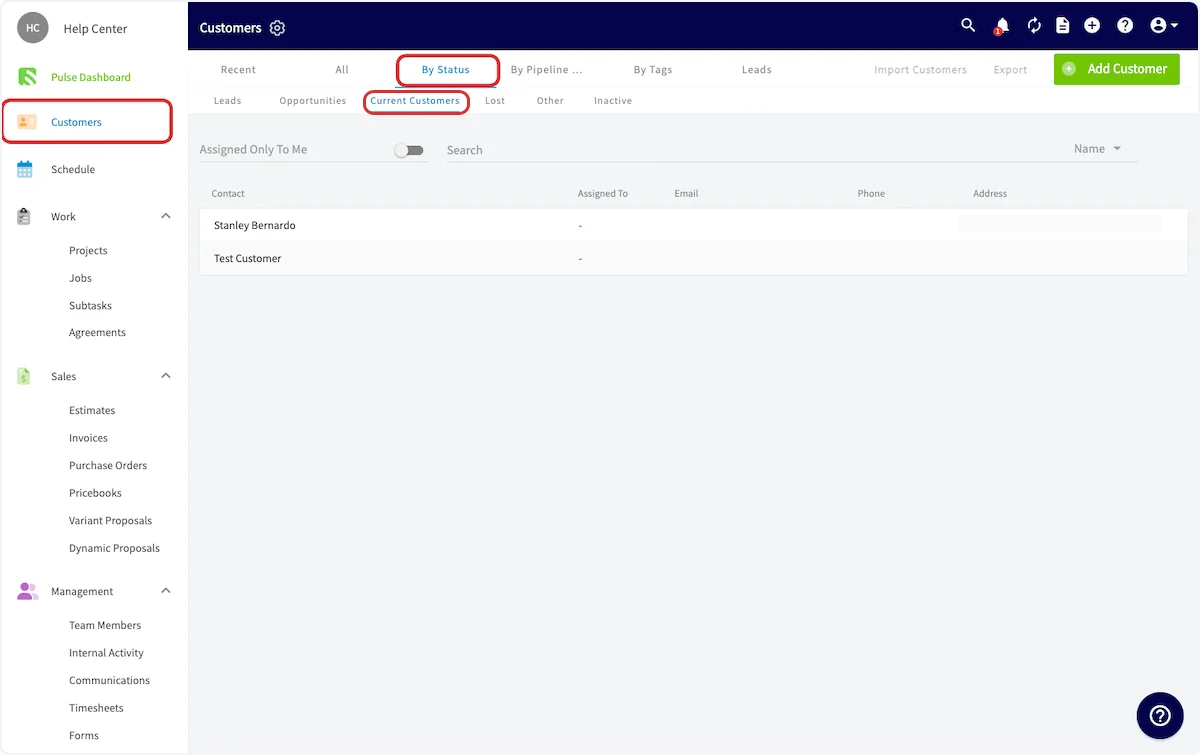
The **By Status** tab on the **Customers** page segments your customer list by status, so you can work one stage at a time.
1. Go to **Customers**.
2. Select the **By Status** tab.
3. Select a status — **Leads**, **Opportunities**, **Current Customers**, **Lost**, **Other**, or **Inactive**.
The list shows every customer marked with the status you selected.
Every new customer record defaults to **Current Customer**, so change the status while you create the record if the customer is a lead or an opportunity.
In the FieldPulse mobile app the same field is **Account Status**, at the top of the **New Customer** form — set it there while you create the customer. See [How to Create a Customer](/customers/managing-customers/creating-a-customer).
### Change the status on an existing customer
Change the status on the customer record as the relationship changes — for example, from **Lead** to **Current Customer** once that customer purchases your services.
1. Go to **Customers** and select the customer you want to update.
2. On the customer record, select **Edit**.
3. Find the **Status** section and choose a new status from the dropdown.
4. Save the customer record.
## Filter customers by status
The **By Status** tab on the **Customers** page segments your customer list by status, so you can work one stage at a time.
1. Go to **Customers**.
2. Select the **By Status** tab.
3. Select a status — **Leads**, **Opportunities**, **Current Customers**, **Lost**, **Other**, or **Inactive**.
The list shows every customer marked with the status you selected.
 ## Settings reference
| **Status** | **What it means** |
| -------------------- | --------------------------------------------------------------------------------------------------------------------------------------------------------------------------------------------------------------------------------------------------------- |
| **Lead** | A potential customer who has shown interest in your services — someone who has sent an inquiry or called you. |
| **Opportunity** | A potential customer you believe has a good chance of buying your service, a step beyond a lead and possibly close to a sale. This could be someone you have given an estimate. |
| **Current Customer** | Someone who has purchased your services. Every new customer record defaults to **Current Customer**. |
| **Lost** | Someone who went through the sales process with you as a lead or an opportunity but did not purchase — for example, someone you gave an estimate who didn't buy. Tracking and marketing to lost customers can help you build your business in the future. |
| **Other** | An account that doesn't fit the other categories, for you to denote as you wish. Some businesses store partners and vendors in their FieldPulse CRM under **Other**. |
| **Inactive** | Can be used for past clients. |
## FAQs
### What is the difference between status and pipeline status?
**Status** is a single field on the customer profile that tracks the customer's lifecycle — Lead, Opportunity, Current Customer, Lost, Other, or Inactive — and a new record defaults to Current Customer. **Pipeline Status** is a separate field that tracks where the customer sits in your sales pipeline, using the pipeline statuses FieldPulse provides or ones you customize after enabling **Custom Sales Pipeline** in **Company Settings** > **Features & Plugins**. You can set both fields while you create the customer — see [Setting Up Customer Statuses](/customers/managing-customers/statuses) and [Setting Up a Custom Sales Pipeline](/customers/leads-pipeline/sales).
## Related articles
* [How to Create a Customer](/customers/managing-customers/creating-a-customer)
* [Customer Record Field Details](/customers/managing-customers/record-fields)
* [Setting Up Customer Custom Fields](/customers/managing-customers/custom-fields)
* [Setting Up a Custom Sales Pipeline](/customers/leads-pipeline/sales)
* [How to Tag and Sort Customers](/customers/managing-customers/tagging-sorting)
Your setup is working when each customer record shows the status that matches where that customer stands, and selecting that status on the **By Status** tab of the **Customers** page brings up that customer.
## Related topics
- [Setting Up a Custom Sales Pipeline](/customers/leads-pipeline/sales.md)
- [How to Create a Customer](/customers/managing-customers/creating-a-customer.md)
- [Setting Up Customer Custom Fields](/customers/managing-customers/custom-fields.md)
- [Setting Up the Marketing 360 Integration](/integrations/marketing/marketing-360.md)
## Settings reference
| **Status** | **What it means** |
| -------------------- | --------------------------------------------------------------------------------------------------------------------------------------------------------------------------------------------------------------------------------------------------------- |
| **Lead** | A potential customer who has shown interest in your services — someone who has sent an inquiry or called you. |
| **Opportunity** | A potential customer you believe has a good chance of buying your service, a step beyond a lead and possibly close to a sale. This could be someone you have given an estimate. |
| **Current Customer** | Someone who has purchased your services. Every new customer record defaults to **Current Customer**. |
| **Lost** | Someone who went through the sales process with you as a lead or an opportunity but did not purchase — for example, someone you gave an estimate who didn't buy. Tracking and marketing to lost customers can help you build your business in the future. |
| **Other** | An account that doesn't fit the other categories, for you to denote as you wish. Some businesses store partners and vendors in their FieldPulse CRM under **Other**. |
| **Inactive** | Can be used for past clients. |
## FAQs
### What is the difference between status and pipeline status?
**Status** is a single field on the customer profile that tracks the customer's lifecycle — Lead, Opportunity, Current Customer, Lost, Other, or Inactive — and a new record defaults to Current Customer. **Pipeline Status** is a separate field that tracks where the customer sits in your sales pipeline, using the pipeline statuses FieldPulse provides or ones you customize after enabling **Custom Sales Pipeline** in **Company Settings** > **Features & Plugins**. You can set both fields while you create the customer — see [Setting Up Customer Statuses](/customers/managing-customers/statuses) and [Setting Up a Custom Sales Pipeline](/customers/leads-pipeline/sales).
## Related articles
* [How to Create a Customer](/customers/managing-customers/creating-a-customer)
* [Customer Record Field Details](/customers/managing-customers/record-fields)
* [Setting Up Customer Custom Fields](/customers/managing-customers/custom-fields)
* [Setting Up a Custom Sales Pipeline](/customers/leads-pipeline/sales)
* [How to Tag and Sort Customers](/customers/managing-customers/tagging-sorting)
Your setup is working when each customer record shows the status that matches where that customer stands, and selecting that status on the **By Status** tab of the **Customers** page brings up that customer.
## Related topics
- [Setting Up a Custom Sales Pipeline](/customers/leads-pipeline/sales.md)
- [How to Create a Customer](/customers/managing-customers/creating-a-customer.md)
- [Setting Up Customer Custom Fields](/customers/managing-customers/custom-fields.md)
- [Setting Up the Marketing 360 Integration](/integrations/marketing/marketing-360.md)