> ## Documentation Index
> Fetch the complete documentation index at: https://help.fieldpulse.com/llms.txt
> Use this file to discover all available pages before exploring further.
# Setting Up Cost Basis and Invoice Profitability
> Turn on invoice cost basis in FieldPulse so every estimate and invoice shows cost, profit, and margin, and pick which roles can see unit costs.
> **Who uses this:** An Admin turns on invoice cost basis in Company Settings and sets whether **Managers and Service Agents** or **Managers only** can see unit costs on records. **Availability:** All regions.
Invoice cost basis records what each line item on an [estimate or invoice](https://www.fieldpulse.com/features/estimates-and-invoices) actually cost you, so FieldPulse can show the profit and margin on the work. Your item list can store a unit cost that the person building the record never sees, which means you can track profitability internally without putting your buy prices in front of the whole team.
## Overview
Once invoice cost basis is on, every estimate and invoice gains a **Cost Basis** tab showing what each line item cost, what it earned, and the margin for the job overall. The cost comes from the unit cost on the line item, so a line item entered without a cost produces no cost basis.
Two settings do the work, and both live on the same screen in Company Settings:
* **Enable Invoice Cost Basis** turns the tracking on and adds the **Cost Basis** tab to estimates and invoices.
* **Invoice Cost Visibility** decides who sees unit costs on those records — **Managers and Service Agents**, or **Managers only**.
The **Cost Basis** tab is also where automatically calculated commission appears on a record. See [Setting Up Invoice-Level Commission](/payments/commissions/invoice-level-commission).
## Video walkthrough
## Before you begin
* **Sign in as an Admin.** Only Admin users can open Company Settings. See [User Roles and Permissions Details](/settings/users-teams/user-roles).
* **Enter unit costs on your line items.** If a line item has no cost, FieldPulse cannot generate a cost basis for it. See [Setting Up Item List & Inventory](/inventory-materials/item-list/adding-items).
* **Decide who should see unit costs** — **Managers and Service Agents**, or **Managers only**.
## Step-by-step setup
### 1. Turn on invoice cost basis
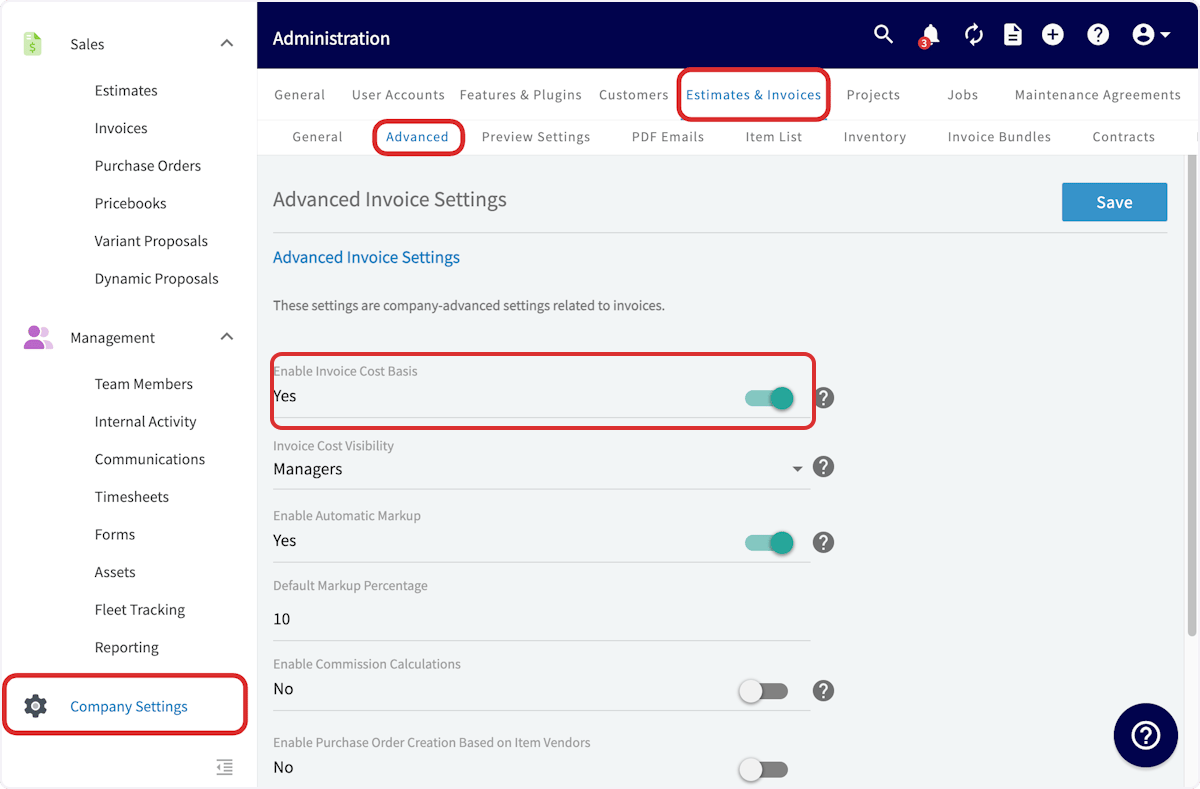
1. Go to **Company Settings** in the left-side menu and select **Estimates & Invoices**.
2. Select **Advanced** in the sub header.
3. On the **Advanced Invoice Settings** page, set **Enable Invoice Cost Basis** to **Yes**.
 ### 2. Set who can see unit costs
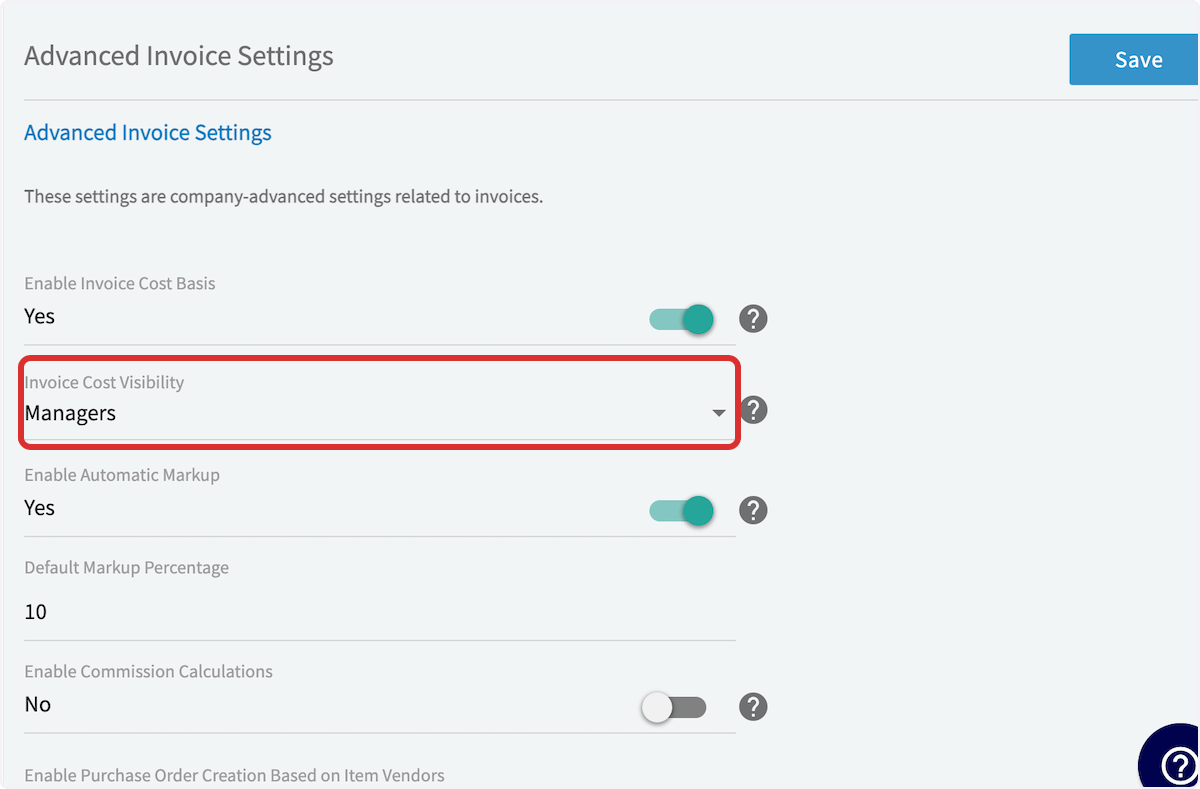
1. In the **Invoice Cost Visibility** dropdown, choose **Managers and Service Agents** or **Managers only**.
2. Select **Save**.
### 2. Set who can see unit costs
1. In the **Invoice Cost Visibility** dropdown, choose **Managers and Service Agents** or **Managers only**.
2. Select **Save**.
 The **Advanced Invoice Settings** page also holds **Enable Automatic Markup** and **Enable Commission Calculations**. Those settings have their own pages — see [How to Use Markups & Margins](/payments/commissions/markups-margins) and [Setting Up Invoice-Level Commission](/payments/commissions/invoice-level-commission).
## Viewing cost basis on a record
1. Open an existing invoice, or create a new invoice and enter your line items with their unit costs and the other relevant information.
2. Scroll to the bottom of the page and select **Save**.
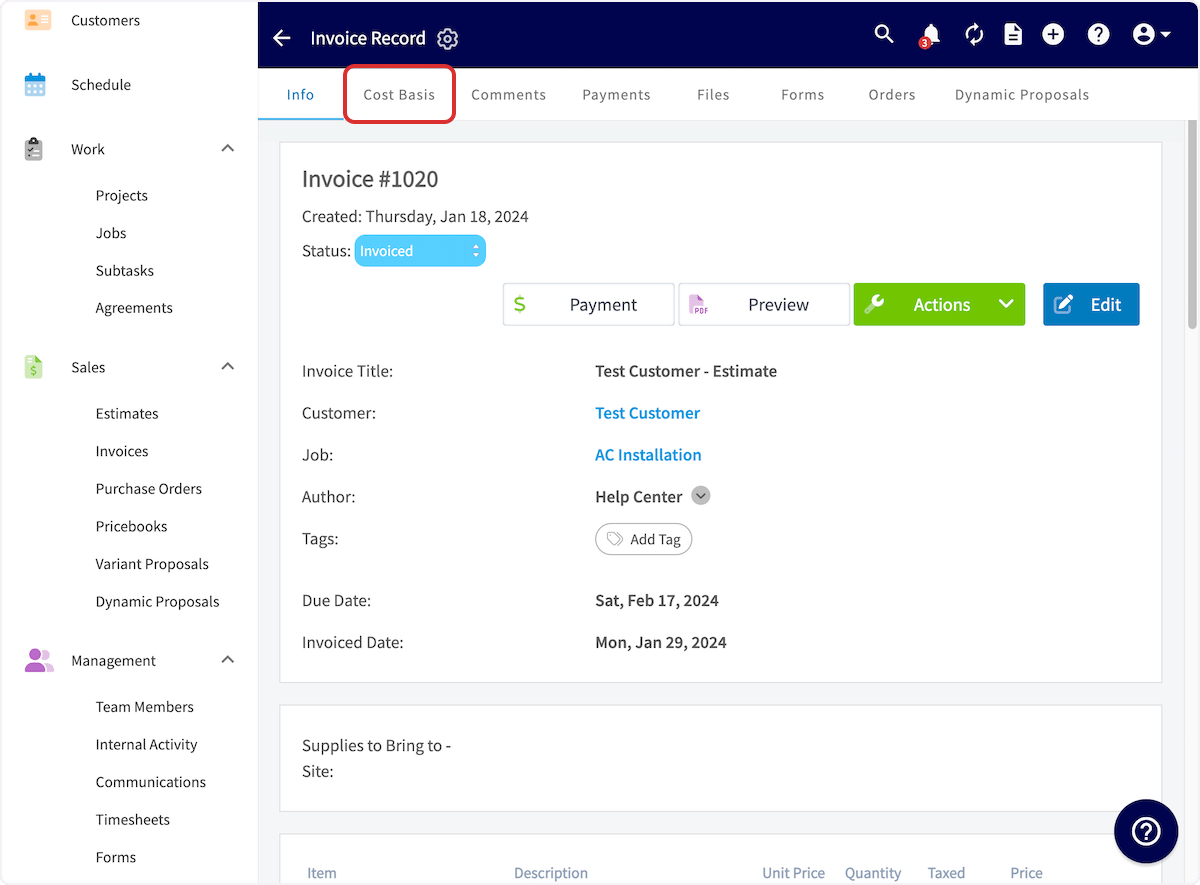
3. On the invoice record, select **Cost Basis** in the top menu.
The **Advanced Invoice Settings** page also holds **Enable Automatic Markup** and **Enable Commission Calculations**. Those settings have their own pages — see [How to Use Markups & Margins](/payments/commissions/markups-margins) and [Setting Up Invoice-Level Commission](/payments/commissions/invoice-level-commission).
## Viewing cost basis on a record
1. Open an existing invoice, or create a new invoice and enter your line items with their unit costs and the other relevant information.
2. Scroll to the bottom of the page and select **Save**.
3. On the invoice record, select **Cost Basis** in the top menu.
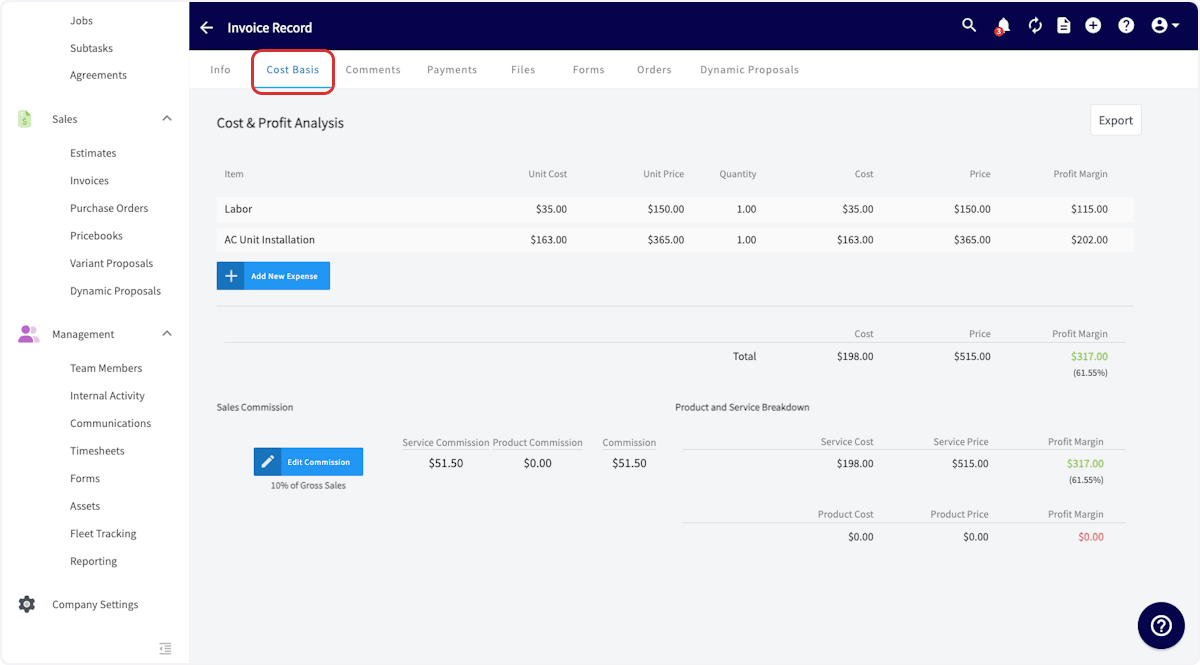
 The tab opens a **Cost & Profit Analysis** view. Each line item lists its **Unit Cost**, **Unit Price**, **Quantity**, **Cost**, **Price**, and **Profit Margin**, and a **Total** row adds up cost, price, and profit margin for the job with the margin percentage. Automatically calculated **Sales Commission** appears below the totals, next to a **Product and Service Breakdown** that separates service cost and price from product cost and price.
From this view you can also:
* Select **Add New Expense** to record a cost that isn't a line item on the invoice.
* Select **Export** to download the breakdown.
The tab opens a **Cost & Profit Analysis** view. Each line item lists its **Unit Cost**, **Unit Price**, **Quantity**, **Cost**, **Price**, and **Profit Margin**, and a **Total** row adds up cost, price, and profit margin for the job with the margin percentage. Automatically calculated **Sales Commission** appears below the totals, next to a **Product and Service Breakdown** that separates service cost and price from product cost and price.
From this view you can also:
* Select **Add New Expense** to record a cost that isn't a line item on the invoice.
* Select **Export** to download the breakdown.
 Discounts do not appear on the Cost Basis tab and are not factored into the cost basis calculation — the total invoice amount shown on the tab is the pre-discount total. If you use [automatic deposit invoices](/integrations/accounting/quickbooks/automatic-deposit-invoices), the deposit line item on the final invoice is excluded from the cost basis calculation and does not appear on the Cost Basis tab or in the export.
## Settings reference
| **Setting** | **Where it lives** | **What it controls** |
| ----------------------------- | -------------------------------------------------- | ------------------------------------------------------------------------------------------------------------------ |
| **Enable Invoice Cost Basis** | Company Settings > Estimates & Invoices > Advanced | Turns cost and profit-margin tracking on for estimates and invoices, adding the **Cost Basis** tab to each record. |
| **Invoice Cost Visibility** | Company Settings > Estimates & Invoices > Advanced | Sets who can see unit costs on estimates and invoices — **Managers and Service Agents** or **Managers only**. |
## Related articles
* [How to Use Markups & Margins](/payments/commissions/markups-margins)
* [Setting Up Invoice-Level Commission](/payments/commissions/invoice-level-commission)
* [Commission Structures Overview](/payments/commissions/commission-structures)
* [Setting Up Default Estimate & Invoice Settings](/estimates-invoices/creating/default-settings)
* [Setting Up Item List & Inventory](/inventory-materials/item-list/adding-items)
* [User Roles and Permissions Details](/settings/users-teams/user-roles)
Your setup is working when you open an invoice with unit costs entered, select **Cost Basis**, and see the cost, profit, and margin for each line item and for the job overall — while the roles you excluded never see the unit costs.
## Related topics
- [Commissions & Profitability](/payments/commissions/index.md)
- [Setting Up Invoice-Level Commission](/payments/commissions/invoice-level-commission.md)
- [Setting Up Flat Rate Job Commissions](/payments/commissions/flat-rate-job-commissions.md)
- [How to Create and Use Commission Templates](/payments/commissions/commission-templates.md)
Discounts do not appear on the Cost Basis tab and are not factored into the cost basis calculation — the total invoice amount shown on the tab is the pre-discount total. If you use [automatic deposit invoices](/integrations/accounting/quickbooks/automatic-deposit-invoices), the deposit line item on the final invoice is excluded from the cost basis calculation and does not appear on the Cost Basis tab or in the export.
## Settings reference
| **Setting** | **Where it lives** | **What it controls** |
| ----------------------------- | -------------------------------------------------- | ------------------------------------------------------------------------------------------------------------------ |
| **Enable Invoice Cost Basis** | Company Settings > Estimates & Invoices > Advanced | Turns cost and profit-margin tracking on for estimates and invoices, adding the **Cost Basis** tab to each record. |
| **Invoice Cost Visibility** | Company Settings > Estimates & Invoices > Advanced | Sets who can see unit costs on estimates and invoices — **Managers and Service Agents** or **Managers only**. |
## Related articles
* [How to Use Markups & Margins](/payments/commissions/markups-margins)
* [Setting Up Invoice-Level Commission](/payments/commissions/invoice-level-commission)
* [Commission Structures Overview](/payments/commissions/commission-structures)
* [Setting Up Default Estimate & Invoice Settings](/estimates-invoices/creating/default-settings)
* [Setting Up Item List & Inventory](/inventory-materials/item-list/adding-items)
* [User Roles and Permissions Details](/settings/users-teams/user-roles)
Your setup is working when you open an invoice with unit costs entered, select **Cost Basis**, and see the cost, profit, and margin for each line item and for the job overall — while the roles you excluded never see the unit costs.
## Related topics
- [Commissions & Profitability](/payments/commissions/index.md)
- [Setting Up Invoice-Level Commission](/payments/commissions/invoice-level-commission.md)
- [Setting Up Flat Rate Job Commissions](/payments/commissions/flat-rate-job-commissions.md)
- [How to Create and Use Commission Templates](/payments/commissions/commission-templates.md)