> ## Documentation Index
> Fetch the complete documentation index at: https://help.fieldpulse.com/llms.txt
> Use this file to discover all available pages before exploring further.
# Internal Activity Overview
> Trace who changed a record in FieldPulse and when, sort the log by related record type, and open the record behind any update from one screen.
> **Who uses this:** Administrators, plus Team Managers and Service Agents whose **View internal activity on records** permission is turned on. **Availability:** All regions.
Internal activity is the log of the updates your team makes in FieldPulse — who made the update, when they made it, and which record it touched. When you need to know why a record looks the way it does, internal activity is where you trace it back.
## Overview
The workflow breakdown internal activity solves is the "who changed this?" question. An invoice detail changes, a job picks up a comment, a customer record gets edited — and without a record of the change, the answer depends on someone remembering what they did. Internal activity captures each of those updates as an event you can review.
Internal activity lives under **Management** in the left-side menu. From there you can oversee every update your team members have made, sort the log by the type of record that was updated, and select an event to open the record behind it.
## How it works
### Open internal activity
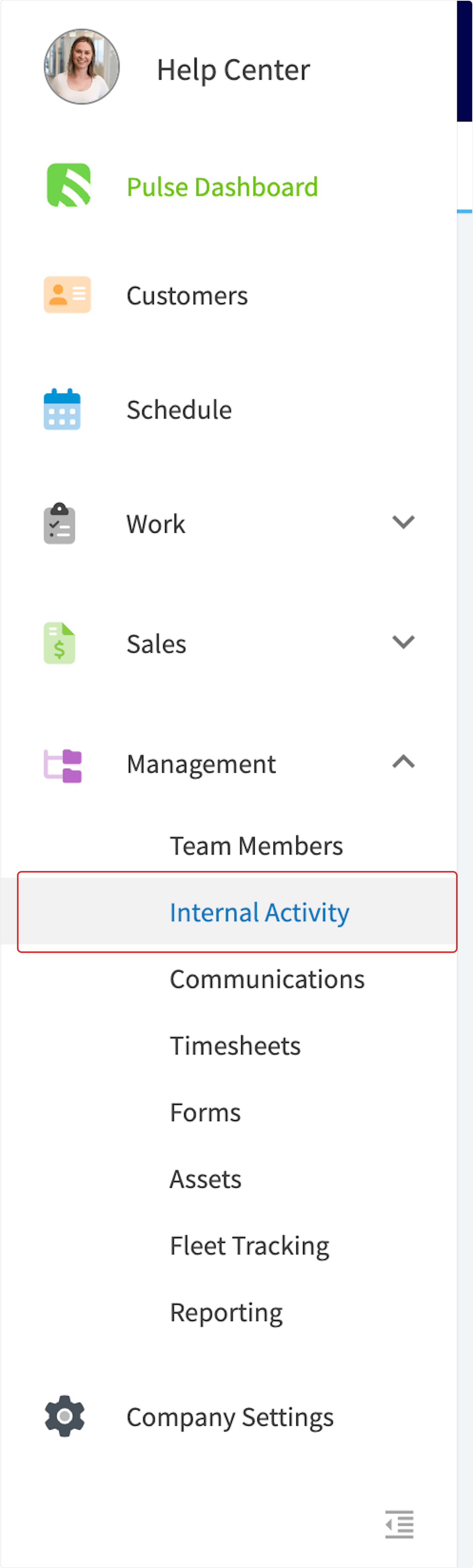
To open internal activity, select **Management** in the left-side menu, then select **Internal Activity**.
 ### Sort the log by related record type
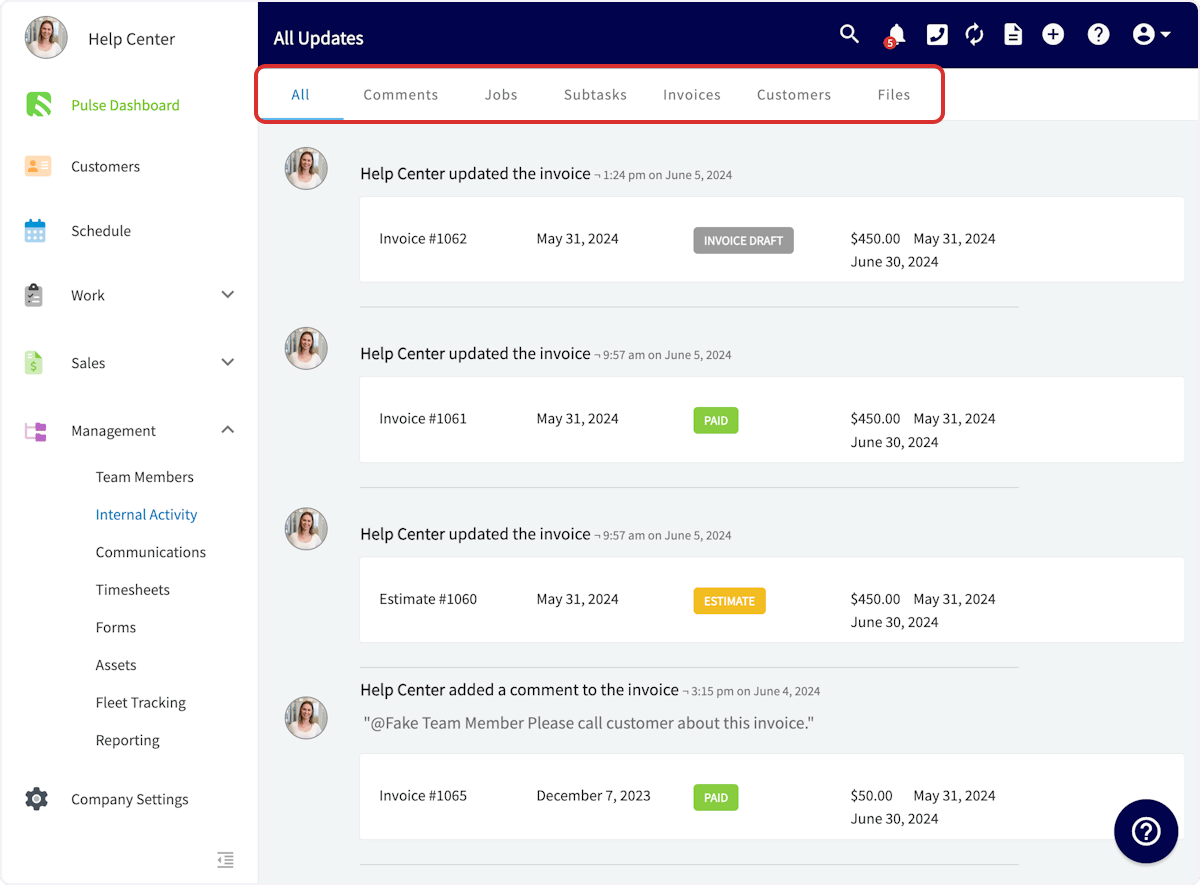
Internal activity opens on **All Updates**, which shows all of the internal activity in your account. Use the tabs at the top of the screen to sort by related record type: **All**, **Comments**, **Jobs**, **Subtasks**, **Invoices**, **Customers**, and **Files**.
### Sort the log by related record type
Internal activity opens on **All Updates**, which shows all of the internal activity in your account. Use the tabs at the top of the screen to sort by related record type: **All**, **Comments**, **Jobs**, **Subtasks**, **Invoices**, **Customers**, and **Files**.
 ### Read an activity event
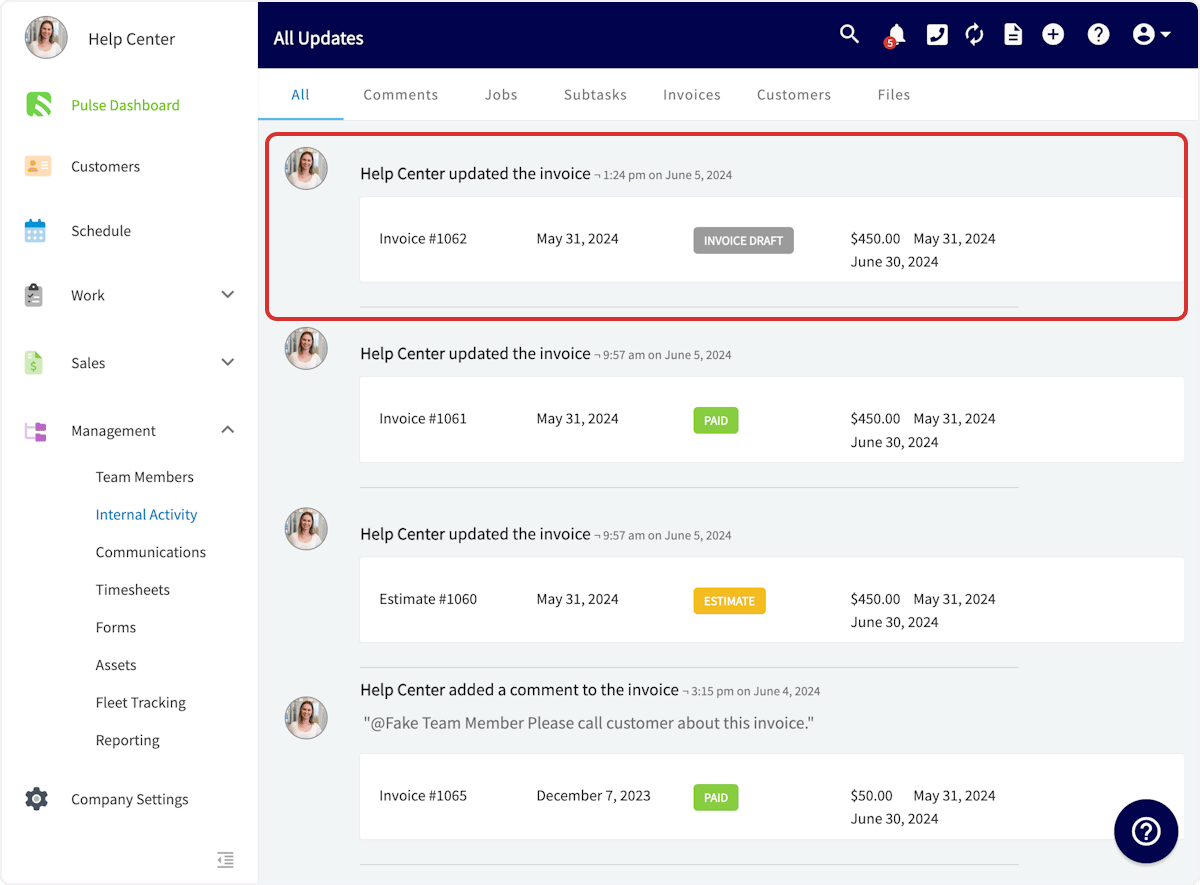
Each entry in the log names the team member and the moment of the change on its top line, with the record that was updated shown underneath it. You can view these details about each update:
* User who made the update
* Update date and time
* Related record
* Related record details
### Read an activity event
Each entry in the log names the team member and the moment of the change on its top line, with the record that was updated shown underneath it. You can view these details about each update:
* User who made the update
* Update date and time
* Related record
* Related record details
 ### Open the record behind an event
Select any internal activity event to view the related record. That takes you from the event straight to the record itself, so you can review it or make a correction.
## Availability
Internal activity is available in all regions. Access is set per user through the **View internal activity on records** permission: Administrators always have it, it is configurable for Team Managers and Service Agents, and Limited Agents do not have it. See [User Roles and Permissions Details](/settings/users-teams/user-roles) for the full role-by-role comparison.
## Related articles
* [Notifications Overview](/settings/notifications/notifications-master-guide)
* [How to Use Notes](/settings/app-preferences/notes)
* [How to Search and Filter Records](/settings/app-preferences/search-filter)
* [User Roles and Permissions Details](/settings/users-teams/user-roles)
## Related topics
- [Reminders Overview](/settings/app-preferences/reminders.md)
- [Notifications Overview](/settings/notifications/notifications-master-guide.md)
- [App Preferences](/settings/app-preferences/index.md)
- [How to Use Notes](/settings/app-preferences/notes.md)
### Open the record behind an event
Select any internal activity event to view the related record. That takes you from the event straight to the record itself, so you can review it or make a correction.
## Availability
Internal activity is available in all regions. Access is set per user through the **View internal activity on records** permission: Administrators always have it, it is configurable for Team Managers and Service Agents, and Limited Agents do not have it. See [User Roles and Permissions Details](/settings/users-teams/user-roles) for the full role-by-role comparison.
## Related articles
* [Notifications Overview](/settings/notifications/notifications-master-guide)
* [How to Use Notes](/settings/app-preferences/notes)
* [How to Search and Filter Records](/settings/app-preferences/search-filter)
* [User Roles and Permissions Details](/settings/users-teams/user-roles)
## Related topics
- [Reminders Overview](/settings/app-preferences/reminders.md)
- [Notifications Overview](/settings/notifications/notifications-master-guide.md)
- [App Preferences](/settings/app-preferences/index.md)
- [How to Use Notes](/settings/app-preferences/notes.md)