

Customers, line items, estimates, invoices and payments created or edited in FieldPulse will be automatically created or edited in QuickBooks. Any customers, line items, estimates, invoices and payments created or edited in QuickBooks will be automatically created or edited in FieldPulse. Once you’ve connected FieldPulse with your QuickBooks account, all of your existing QuickBooks data will be imported into your FieldPulse account. What’s most important is that your sleep mode is disabled so the connection is constantly running. This will ensure a successful sync and eliminate your need for double entry.Documentation Index
Fetch the complete documentation index at: https://fieldpulse.mintlify.app/llms.txt
Use this file to discover all available pages before exploring further.
Before syncing, please note:
- FieldPulse integrates with QuickBooks Desktop 2024 and newer.
- We integrate with the Windows version of QuickBooks Desktop and do not support QuickBooks Desktop for Mac or any other systems.
- The setup must be completed in single-user mode within QuickBooks Desktop.
- We support Contractor, Pro, Premier, and Enterprise editions of QuickBooks Desktop.
-
You must disable sleep mode on your computer in order for the sync to run. (Note: If this is not disabled, the sync will not work.)
- Settings > Within Window > System > Power and Sleep > Set to ‘Never.’
- You must have a stable internet connection.
-
If you utilize Customer Communications within FieldPulse:
-
Turn off your Automatic Triggers linked to Estimate and Invoice records.
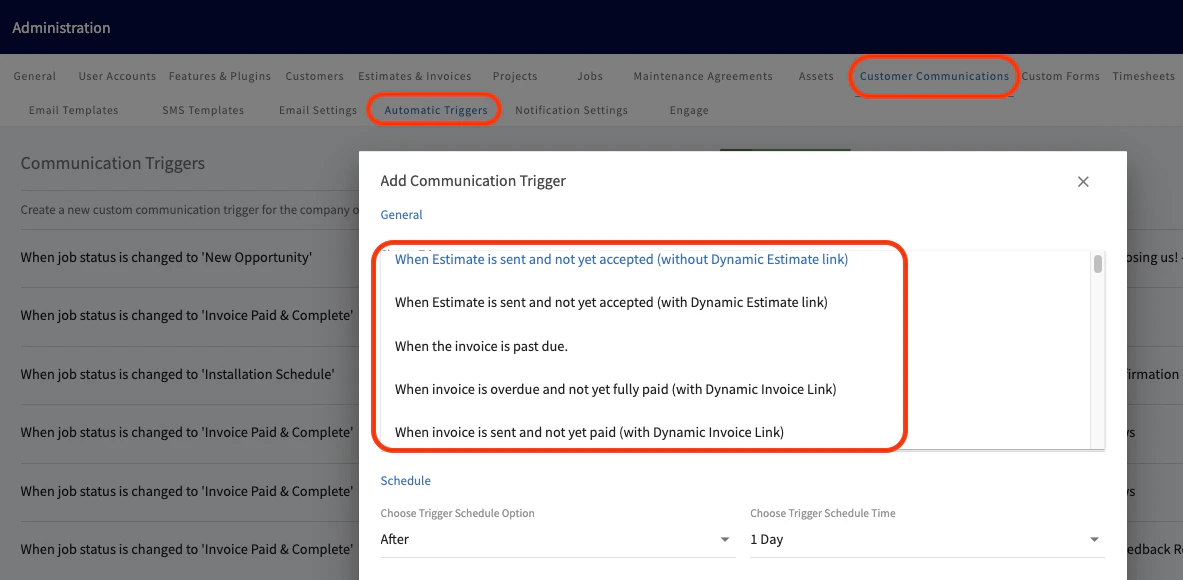
- Disable Notification Settings to prevent customers from receiving updates about all Estimate and Invoice records.
-
Turn off your Automatic Triggers linked to Estimate and Invoice records.
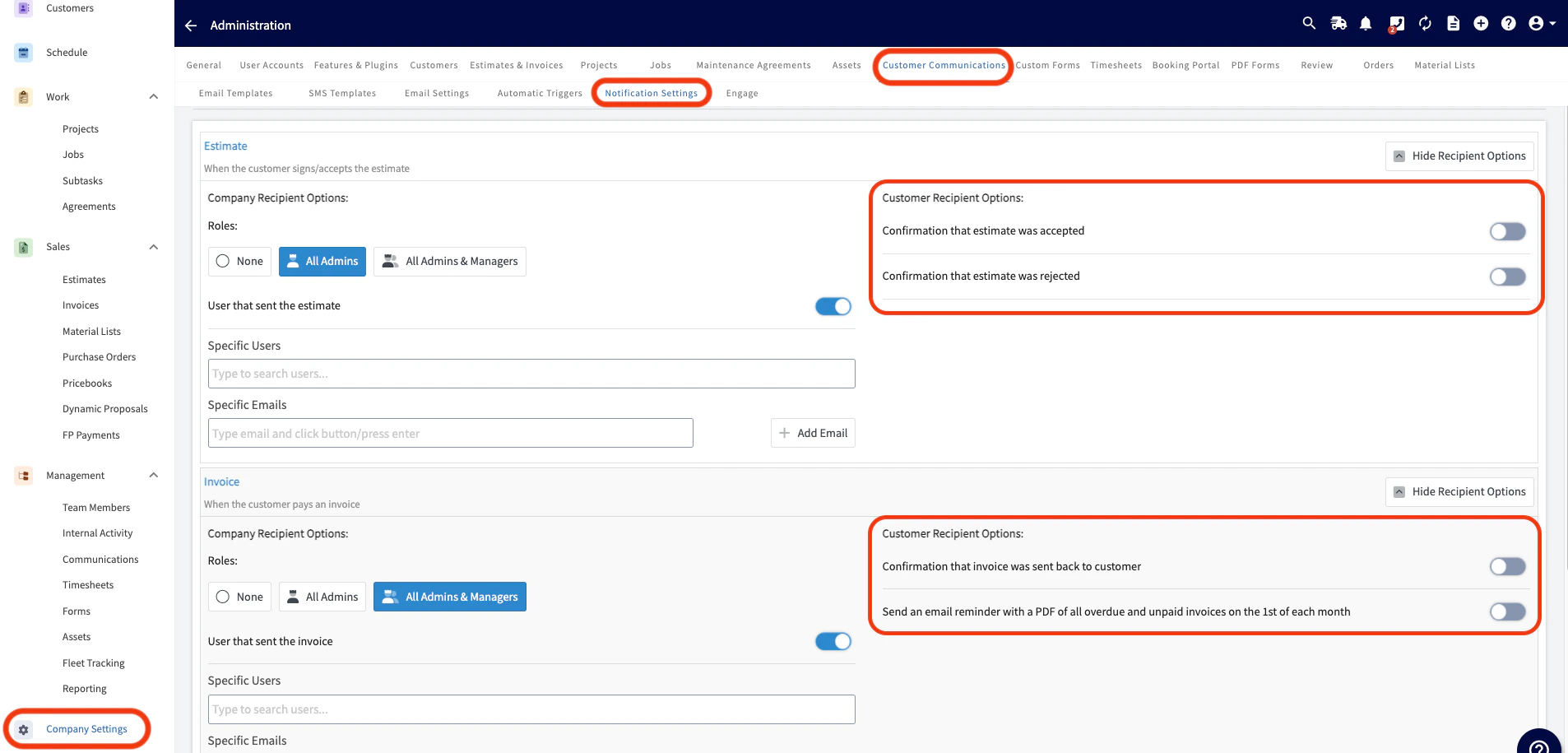
What will sync?
-
Customers
- Three levels of sub customers (parent/child) will sync to FieldPulse.
-
Customer Messages
- We will only sync the latest message.
- This is equivalent to the Customer Note section in FieldPulse.
- Archived/ Deleted Customers - Archived and deleted customers will sync in their current state. For example if a customer is archived/deleted in QuickBooks Desktop the customer will sync over to FieldPulse as archived/deleted.
-
Ship To Addresses
-
All of your Ship To addresses in QuickBooks Desktop will sync as Locations in FieldPulse.
- Address Name → Location Name
- Address, City, State, County, Zip → Mapped directly
- Note → Sync to location notes
- When QuickBooks Desktops’s default Ship To address changes, FP will automatically update the matching location as the new main location. Matching is based on address, not name. If no match exists, a new location will be created.
-
All of your Ship To addresses in QuickBooks Desktop will sync as Locations in FieldPulse.
-
Bill To Address
- Your Bill To address syncs exactly as it appears in QuickBooks Desktop, including the customer name.
- Updates made in QBD will update the corresponding Bill To field in FieldPulse, and changes made in FieldPulse will sync back to QBD.
- Classes
- Tax Codes
-
Estimates
- Date
- Expiration Date
- Notes
- Business Classes
- Tax Codes
-
Invoices
- FieldPulse pulls the same Invoice # sequence as QuickBooks
-
Line Items
- Item Name
- Description
- Unit Cost/Price
- Quantities
- Tax/Non Tax
- Total Inventory & Quantities
-
Purchase Orders
- This is a one way sync from FieldPulse to QuickBooks Desktop.
-
Timesheets
- Timesheets can be synced if you use QuickBooks Time. FieldPulse clock-in and clock-out dates/times will sync as well as the timesheet duration. (Note: This is a one-way sync from FieldPulse Timesheets to QuickBooks Time.)
-
Credit Memos (One Way QuickBooks Desktop to FieldPulse)
- Credit memos will sync as general payments and there’s no functionality in FieldPulse to indicate whether a payment is a credit or a direct payment; this is only accessible via QuickBooks Desktop.
-
Vendors
- This can be a tax code
- Suppliers
What won’t sync?
-
Customer
- Custom Fields
- If the customer name exceeds 31 characters the sync will fail.
- Special characters such as $,&,#, @, +, {,},: all can cause syncing issues.
-
Classes
- Subclasses are currently not supported and will not sync.
-
Tax Codes
- Custom Fields
- Multiple tax codes
-
Estimates
- Custom Fields
- Payments on Estimates. It essentially leaves a ‘credit’ on the customer record in QuickBooks. This will show as ‘undeposited funds’ but not associated with any invoice or estimate.
- Un-Selected Estimate Options
- Groupings
-
Invoices
- Custom Fields
- If the invoice item name exceeds 31 characters the sync will fail.
- Special characters such as $,&,#, @, +, {,},: all can cause syncing issues.
- Groupings
- ‘Shipping’ and ‘Deposit’ fields if they contain values
-
Line Items
- Custom Fields
- Negative line items currently not supported. This is currently considered a ‘discount’ in QuickBooks Desktop.
- Credit Memos currently not supported.
- Special characters such as $,&,#, @, +, {,},: all can cause syncing issues.
- Sales receipts not currently supported.
-
Payments
- Additional payment methods outside of cash, check, credit card or ACH are not supported. (Ex. gift card).
- Custom Fields
- Payments exceeding the invoice total (Tips)
QuickBooks Desktop User Permissions
For FieldPulse and QuickBooks Desktop to properly synchronize, the following role permissions need to be enabled for the user under whom the QuickBooks Web Connector will be running. To make these changes, navigate to Edit Role.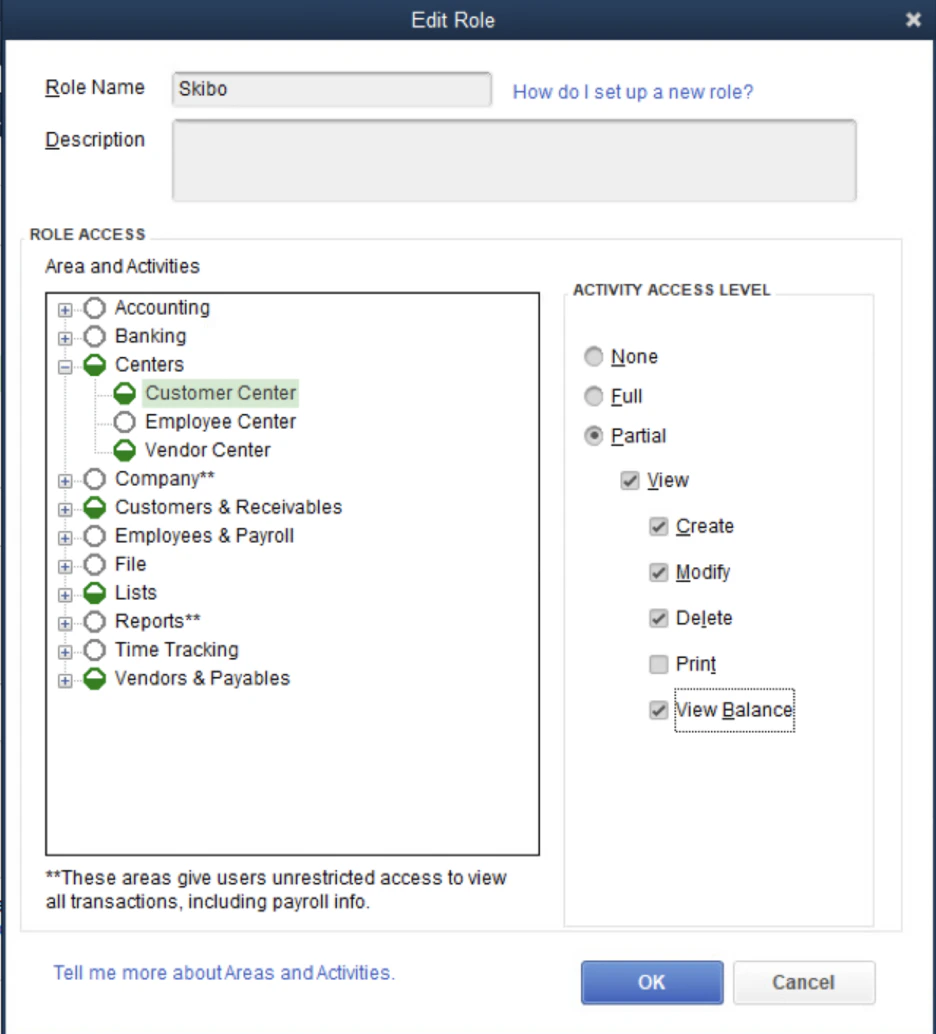
Area
Activities
Access Level
Permissions
Centers Customer Center Partial View, Create, Modify, Delete, View Balance Centers Vender Center Partial View, Create, Modify, Delete, View Balance Customers & Receivables Accounts Receivable Accounts Partial View Customers & Receivables Assess Finance Charges Full Customers & Receivables Change Item Prices Full Customers & Receivables Credit Card Refunds Full Customers & Receivables Credit Memos Partial View, Create, Modify, Delete Customers & Receivables Estimates Partial View, Create, Modify, Delete Customers & Receivables Invoices Partial View, Create, Modify, Delete Customers & Receivables Receive Payments Full Customers & Receivables Sales Orders Partial View, Create, Modify, Delete Customers & Receivables Sales Receipts Partial View, Create, Modify, Delete Customers & Receivables Statement Charges Full Customers & Receivables Statements Full Customers & Receivables Undeposited Funds Account Partial View Lists All activities in this section Partial View, Create, Modify, Delete Vendors & Payables Accounts Payable Accounts Partial ViewFAQs
Does FieldPulse sync classes for QuickBooks Desktop? Yes, FieldPulse will sync classes on estimates and invoices for QuickBooks Desktop. Classes can also exist on individual line items, but we do not sync these. Do refunds processed in FieldPulse sync to QuickBooks Desktop? No. Refunds do not sync between FieldPulse and QuickBooks Desktop and will need to be reconciled manually.Have additional questions? Contact us at support@fieldpulse.com or use the chat feature in the bottom right corner of your screen.