Who uses this: Administrators deciding which payment option the business will use — applying for FieldPulse Payments happens in Company Settings, which only Administrators can open. Availability: FieldPulse Payments is available to businesses located in the United States. Partner Payments is delivered through Bank of America, Card Connect, Fullstack, or NMI (Network Merchants, Inc.).FieldPulse offers two payment options for collecting and managing your customer payments: FieldPulse Payments, the in-house FieldPulse payment processor, and Partner Payments, delivered through one of the FieldPulse partner processors. Each option supports a different set of features, and this page shows exactly what is available with each one.
Overview
FieldPulse processes customer payments two ways, and the option behind your account decides which payment features you can use.- FieldPulse Payments — the native, in-house FieldPulse payment processor. Credit card and ACH payments are taken and tracked inside FieldPulse on a FieldPulse Payments merchant account. See FieldPulse Payments Overview.
- Partner Payments — payment processing delivered through a FieldPulse partner processor: Bank of America, Card Connect, Fullstack, or NMI (Network Merchants, Inc.). The features available on Partner Payments are limited to the ones in the feature comparison below.
How it works
New payment functionality is released on FieldPulse Payments, and Partner Payments supports a fixed list of features.FieldPulse Payments is where new features are released
FieldPulse Payments is the native FieldPulse payments solution, and it is where all new payment functionality is delivered going forward. As new features are released they are always available on FieldPulse Payments, and in some cases only on FieldPulse Payments — of the features compared below, Tap to Pay on iPhone is supported on FieldPulse Payments alone. FieldPulse Payments runs on a merchant account you apply for from inside FieldPulse, in Company Settings › Features & Plugins on the purple FieldPulse Payments tile. See Setting Up FieldPulse Payments for the full application.Partner Payments supports a set feature list
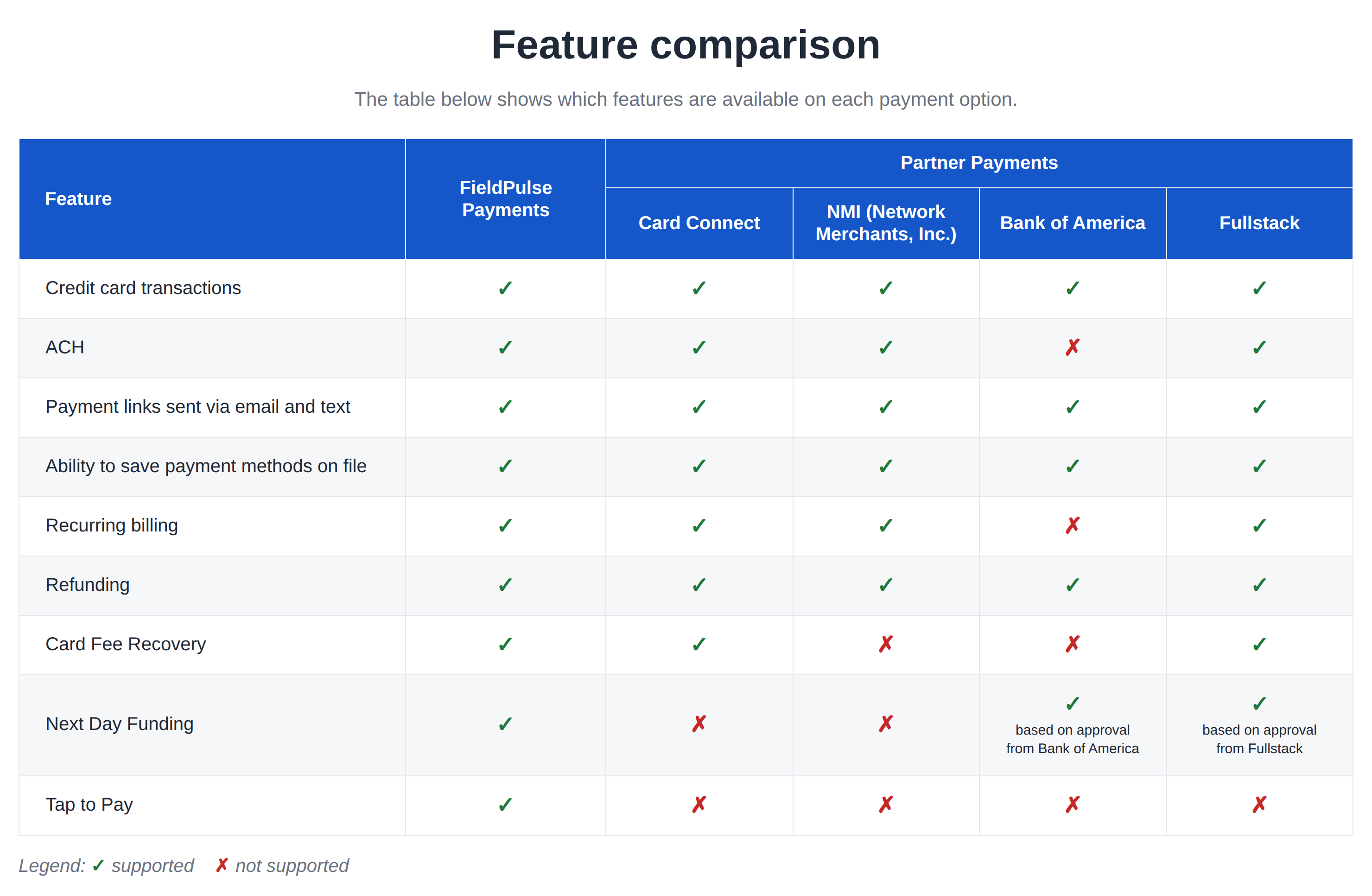
Partner Payments runs through one of four FieldPulse partner processors — Bank of America, Card Connect, Fullstack, or NMI (Network Merchants, Inc.) — and the features available on Partner Payments are limited to the ones listed in the feature comparison below. The four processors do not all support the same features:- ACH is not supported on Bank of America.
- Card Fee Recovery is supported on Card Connect and Fullstack, but not on Bank of America or NMI.
- Next Day Funding is supported through Bank of America and Fullstack, subject to approval and activation by the respective provider. Next Day Funding is not supported on Card Connect or NMI.
Feature comparison
The comparison below covers FieldPulse Payments and the four Partner Payments processors.