
Who uses this: A technician sends the trip tracking SMS from the job record in the FieldPulse mobile app. Availability: All regions.Trip tracking is a text message with a live map link that a technician sends to a customer from the FieldPulse mobile app on the way to a job. The link opens a real-time map showing the technician’s location and estimated arrival time. This page covers trip tracking from the customer’s side — the text that arrives on the customer’s phone, the map behind the link, and which parts of both you control.
Overview
When a technician is heading to a job, the technician texts the customer a live trip tracking link, and the customer opens it to follow the technician’s location on a map instead of waiting without knowing when the technician will arrive. Trip tracking is one of the messages FieldPulse sends through Customer Communications. The technician sends it from the job record: Actions > Send Customer Communication > SMS > Send Trip Tracking SMS to Customer. For the send steps in full, see How to Send Communications to Customers.Before you begin
Two things have to be in place before a customer can receive a trip tracking text:- Customer communications are enabled on your account. See Customer Communications Overview for what the feature covers.
- Location services are on for FieldPulse on the technician’s device. FieldPulse needs access to the technician’s location to share trip tracking information with the customer.
How it works
The text the customer receives
The customer receives an SMS carrying the saved trip tracking message, the technician’s arrival estimate, and the tracking link. In the message below, the arrival estimate reads approximately 10 minutes, the link points to location.fieldpulse.com, and the message closes with an opt-out line telling the customer to reply STOP to stop further communications — see Customer Notification Preferences and SMS Opt-Out Details.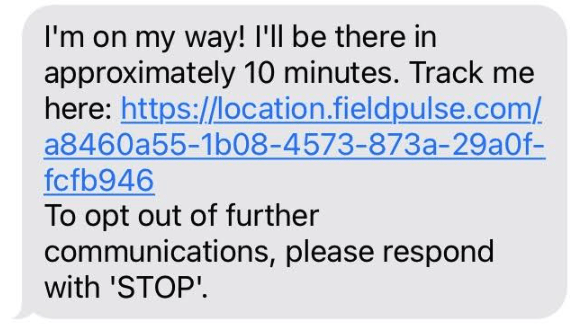
Quick tip: The technician can also include their profile photo in the message, so the customer knows exactly who to expect at the door.
The live tracking map
The tracking link opens a real-time map at location.fieldpulse.com. In the example below, the customer has opened it in their phone browser: the map shows the technician’s current location on the way to the job, and a card under the map names the technician and shows their status.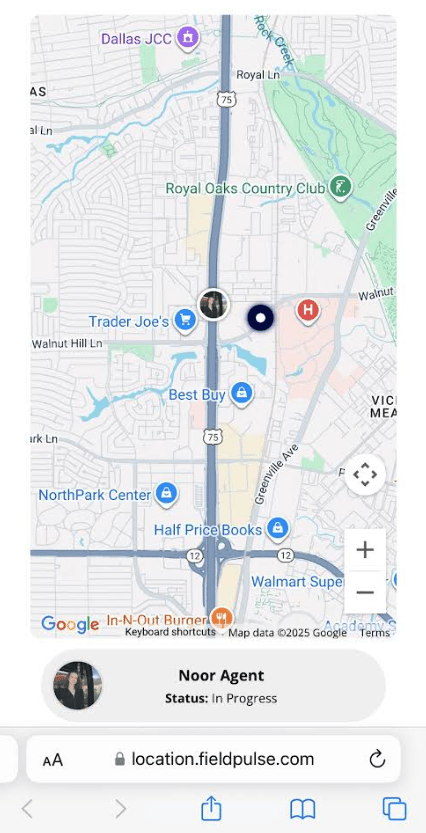
What you can configure
To learn more about trip tracking and the rest of Customer Communications, see How to Send Communications to Customers.
Notes & limitations
- The tracking link stays active for one hour after it is sent. That is long enough for the customer to follow the arrival without leaving the technician’s location visible for the rest of the day.
- Trip tracking messages are sent manually. A technician sends each one from the FieldPulse mobile app; trip tracking cannot be attached to an automatic communication trigger.