
Create an Item Usage Report
Date Range
Begin by selecting date type you’d like to use to generate the report.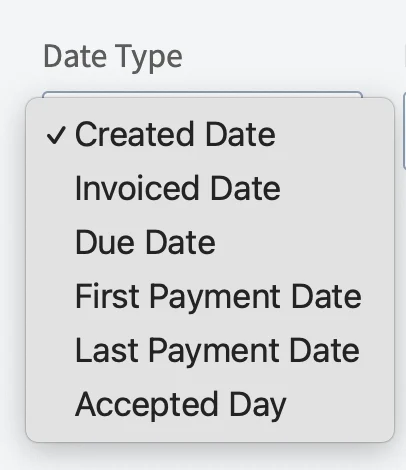
- Created Date: When the invoice was created
- Invoiced Date: When the invoice was sent to the customer
- Due Date: When the invoice was due
- First Payment Date: When the customer made their first payment on the invoice
- Last Payment Date: When the customer made their last payment on the invoice
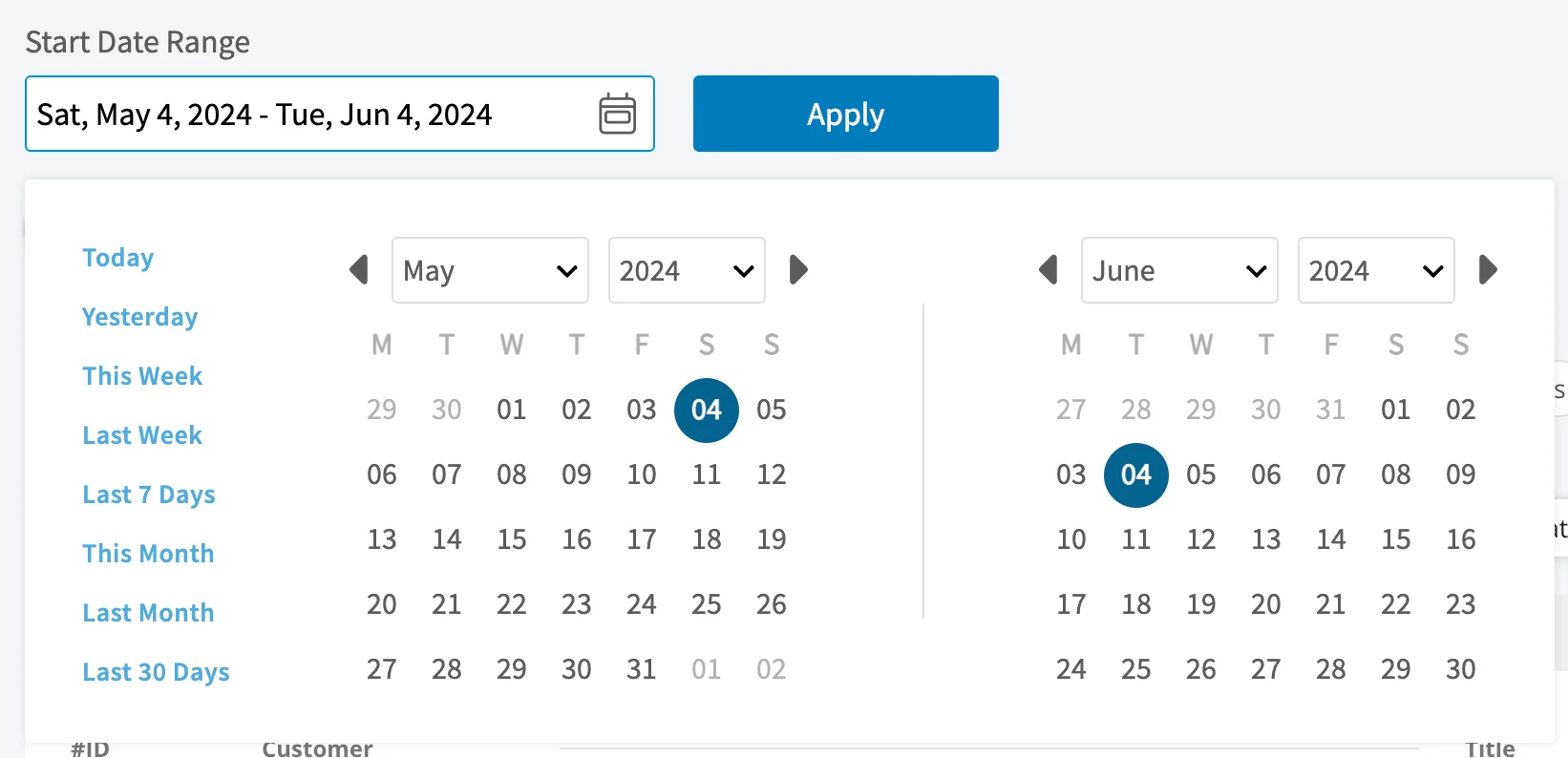
- Today: From 12:00 AM to the current time
- Yesterday: Previous day from 12:00 AM to 11:59 PM
- This Week: From Monday through Sunday of the current week
- Last Week: Previous week
- Last 7 Days: Previous seven days, including today
- This Month: From the first of the current month to the current day
- Last Month: Entire month before the current month
- Last 30 Days: Previous 30 days, including today
- Custom: Use the calendar to select start and end dates
Columns
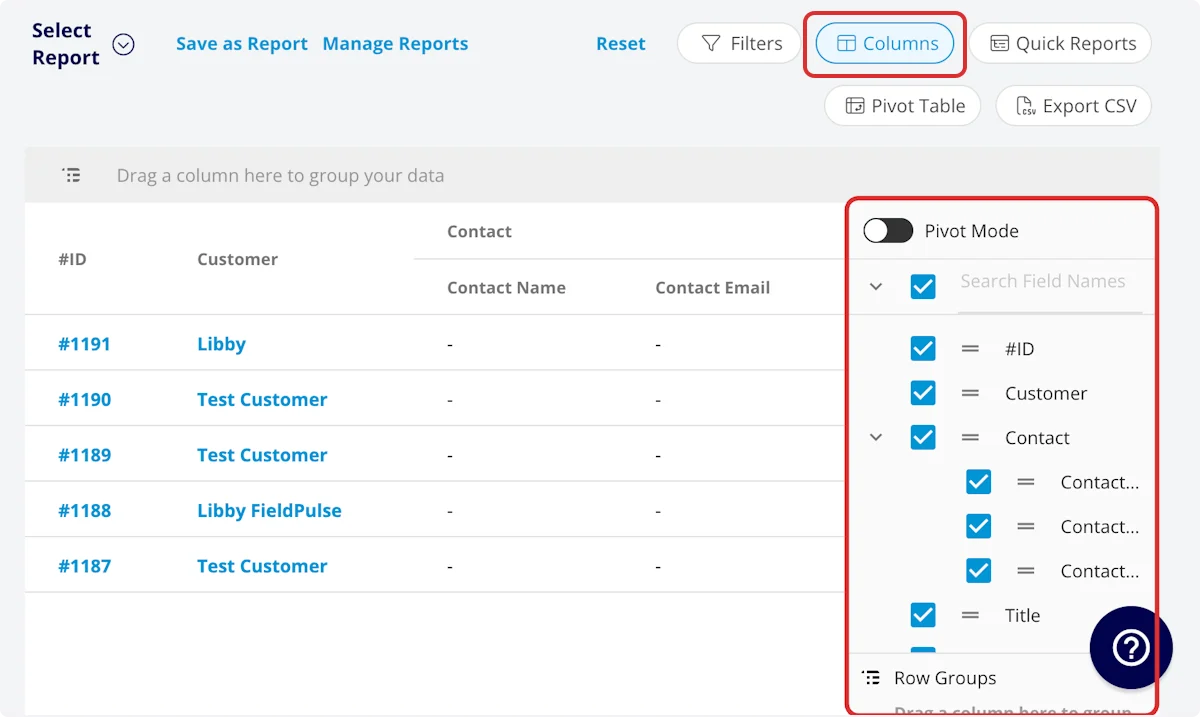
- Item Name: Line item name
- Item Type: Product - Inventory, Product - Non Inventory, or Service - Labor
- Item Description: Item description
- Item Quantity: Item quantity on related invoice
- Unit Cost: Unit cost
- Unit Price: Unit price
- SKU/ID#: Item #/SKU
- Serialized Inventory: The specific serial number for a serialized inventory item, including for items transferred in from a Material List.
- Total Item Cost: Unit cost * item quantity
- Total Item Price: Unit price * item quantity
- QuickBooks Class: If you sync with QuickBooks, the class will be displayed here.
-
Invoice
- Invoice ID#: Invoice number
- Invoice Customer: Customer linked to the invoice
- Invoice Creator Name: Author of the invoice
- Invoice Created Date: Date and time the invoice was created
- Invoice Sent Date: Date and time the invoice was sent to the customer
- Invoice Status: Invoice status
- Custom Fields: User-created fields related to the invoice
-
Parent Job
- Job ID#: Job number
- Job Title: Job record title
- Job Status: Job workflow status
- Start Date/Time: Date and time the job was scheduled to begin
- End Date/Time: Date and time the job was scheduled to end
- Created At: Date and time the job record was created
- Location: Service location for the job
- Assigned Team Members: Users assigned to the job
- Assigned Teams: Teams assigned to the job
- Notes: Notes on job record
- Field Notes: Notes left by assigned user(s) on the job
- Tags: Tags attached to the job record
- Scheduled Duration: Time scheduled for the job, recorded in HH:MM:SS
- Job Duration: Time spent in In Progress status type, recorded in HH:MM:SS
- Travel Duration: Time spent in On The Way status type, recorded in HH:MM:SS
- Custom Fields: User-created fields related to the job record
- Grouping Title: Grouping under which line item is housed on invoice
Filters
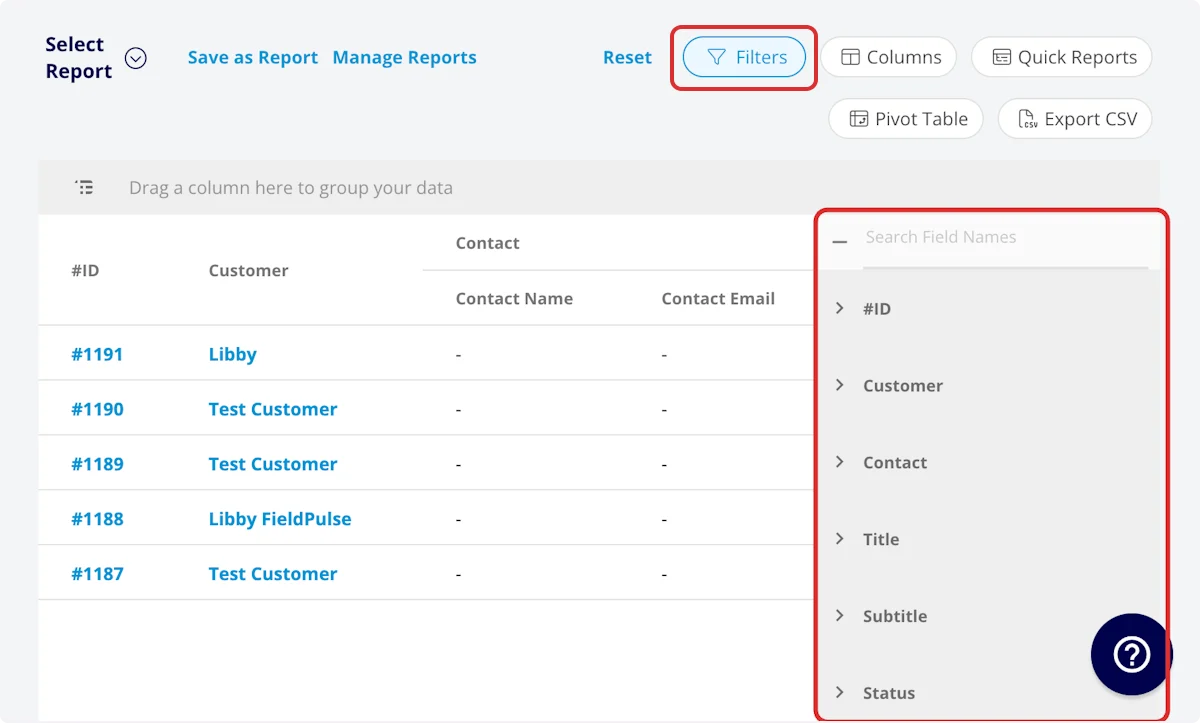
- Item Name: filter by contents
- Item Description: filter by contents
- SKU/ID#: filter by contents
-
Invoice
- Invoice ID#: filter by contents
- Invoice Customer: filter by contents
- Invoice Creator Name: filter by contents
- Invoice Created Date: filter by date
- Invoice Sent Date: filter by date
- Invoice Status: select status
-
Parent Job
- Job ID#: filter by contents
- Job Title: filter by contents
- Job Status: select status
- Start Date/Time: filter by date
- End Date/Time: filter by date
- Created At: filter by date
- Location: filter by contents
- Assigned Team Members: filter by contents
- Assigned Teams: filter by contents
- Notes: filter by contents
- Field Notes: filter by contents
- Tags: filter by contents
- Scheduled Duration: filter by contents
- Job Duration: filter by contents
- Travel Duration: filter by contents
- Grouping Title: filter by contents
Common Item Usage Reports
Item Usage by Item
Use this report to view your item usage by item, as well as the total item cost and price. Columns: Customize to your needs, but must include Item Name, Total Item Cost, and Total Item Price. Group By: Item NameItem Usage by Job
Use this report to view your item usage by job. Columns: Customize to your needs, but must include Parent Job. Group By: Parent JobItem Usage by Customer
Use this report to view your item usage by customer. This report is helpful when you’ve performed multiple jobs for a customer over an extended period of time. Columns: Customize to your needs, but must include Invoice Customer. Group By: Invoice CustomerItem Usage - Roll Up Reporting
The item usage report is included in roll-up reporting for locations/franchisors, providing a comprehensive view of item usage across all of your operations.Have additional questions? Contact us at support@fieldpulse.com or use the chat feature in the bottom right corner of your screen.